15 Best External Blu-ray Drives That Bring Discs Back to Life
By George 17 min read
Disclosure: This post may contain affiliate links. If you buy through them, we may earn a commission at no extra cost to you.
If you still own a collection of Blu-ray discs, you need a reliable external drive to access them. Not every drive handles 4K playback, BD-XL discs, or fast write speeds equally. Some include USB-C hubs or card readers, making them more versatile. Choosing the wrong one wastes money and causes compatibility headaches. The 15 options below break down exactly what each drive offers so you can match specs to your actual needs.
| Portable External Blu-Ray Drive & CD DVD Burner |

| Budget-Friendly Pick | Disc Support: Blu-ray (read), DVD, CD (read/write) | Max Read Speed: BD 6x, DVD 8x, CD 24x | Interface: USB 3.0 Type-A & Type-C | VIEW LATEST PRICE | Read Our Analysis |
| 8-in-1 External Blu-ray drive USB-C Hub & Card Reader for Laptop |
| Most Versatile | Disc Support: Blu-ray (read/write), DVD, CD, M-Disc | Max Read Speed: BD 6x, DVD 8x, CD 24x | Interface: USB-C 3.0 & USB-A | VIEW LATEST PRICE | Read Our Analysis |
| External Blu-Ray DVD CD Burner Drive (USB 3.0) |

| Best Value | Disc Support: Blu-ray (read), DVD, CD (read/write) | Max Read Speed: BD 6x, DVD 8x, CD 24x | Interface: USB 3.0 Type-A & Type-C | VIEW LATEST PRICE | Read Our Analysis |
| ASUS SBW-06D5H-U External Slim Blu-ray Burner USB-C |

| Editor’s Choice | Disc Support: Blu-ray (read/write), DVD, CD, M-Disc, BDXL | Max Read Speed: BD 6x (8x listed in some specs), DVD 8x, CD 24x | Interface: USB 3.1 Type-A & Type-C | VIEW LATEST PRICE | Read Our Analysis |
| External Blu-Ray Drive 6X Bd-Re Burner USB-C and USB 3.0 |
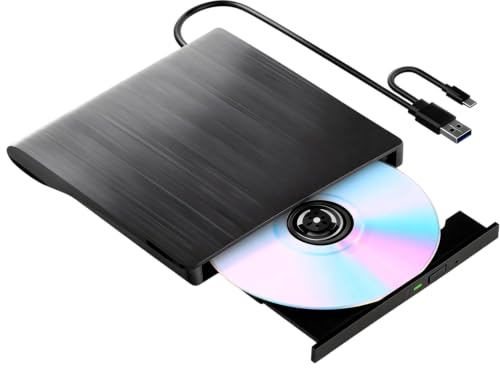
| Best For Burners | Disc Support: Blu-ray (read/write), DVD, CD | Max Read Speed: BD 6x, DVD 8x, CD 24x | Interface: USB 3.0 Type-A & Type-C | VIEW LATEST PRICE | Read Our Analysis |
| Archgon Aluminum External 4K Blu-Ray Writer Drive |

| Premium 4K Pick | Disc Support: Blu-ray (read/write), DVD, CD, UHD 4K, M-Disc | Max Read Speed: BD 6x, DVD/CD not specified | Interface: USB 3.0 | VIEW LATEST PRICE | Read Our Analysis |
| Multifunction Desktop Blu Ray Drive Blu Ray Burner with HDD Interface |

| Best Heavy-Duty | Disc Support: Blu-ray (read/write), DVD, CD | Max Read Speed: BD 16x, DVD 16x, CD 40x | Interface: USB-C; 2x USB 3.0 hub ports | VIEW LATEST PRICE | Read Our Analysis |
| External Blu-Ray Drive USB-A & Type-C DVD CD Reader Writer for Mac Windows |

| Most Portable | Disc Support: Blu-ray (read), DVD, CD (read/write) | Max Read Speed: BD 6x, DVD 8x, CD 24x | Interface: USB 3.0 Type-A & Type-C | VIEW LATEST PRICE | Read Our Analysis |
| ASUS ZenDrive External DVD Burner with M-Disc Support |

| DVD-Only Pick | Disc Support: DVD, CD, M-Disc (no Blu-ray) | Max Read Speed: DVD 8x, CD 24x | Interface: USB 2.0 & Type-C | VIEW LATEST PRICE | Read Our Analysis |
| External USB 3.0 Blu-Ray DVD Drive for Laptop/PC |

| Best For Mac | Disc Support: Blu-ray (read), DVD, CD (read/write) | Max Read Speed: BD 6x, DVD 8x, CD 24x | Interface: USB 3.0 & Type-C | VIEW LATEST PRICE | Read Our Analysis |
| Portable External Blu-Ray Drive & Burner for PC |

| Best Multi-Function | Disc Support: Blu-ray (read/write), DVD, CD | Max Read Speed: BD 6x, DVD 8x, CD 24x | Interface: USB 3.0 Type-A & Type-C | VIEW LATEST PRICE | Read Our Analysis |
| Sony BDP-S1700U Full HD 1080p Blu-ray DVD Player with HDMI Cable |

| Best Standalone Player | Disc Support: Blu-ray (read/playback only), DVD | Max Read Speed: DVD/BD 1080p playback (speed not specified) | Interface: HDMI, front USB | VIEW LATEST PRICE | Read Our Analysis |
| LG GP65NB78 Portable External DVD Writer Drive |

| Best Lightweight | Disc Support: DVD, CD, M-Disc (no Blu-ray) | Max Read Speed: DVD 8x, CD 24x | Interface: USB 2.0 | VIEW LATEST PRICE | Read Our Analysis |
| External Blu-Ray Drive USB 3.0 for Laptop/Desktop |

| Best For Beginners | Disc Support: Blu-ray (read/write up to 50GB), DVD, CD | Max Read Speed: BD/DVD/CD 1x (per listed spec) | Interface: USB 3.0 & Type-C | VIEW LATEST PRICE | Read Our Analysis |
| External DVD Drive USB DVD Drive for Laptop Featuring 8-in-1 Hub |

| Best Hub Integration | Disc Support: DVD, CD only (no Blu-ray) | Max Read Speed: DVD 8x, CD 24x | Interface: USB-A & Type-C combo | VIEW LATEST PRICE | Read Our Analysis |
More Details on Our Top Picks
Portable External Blu-Ray Drive & CD DVD Burner
If you’re watching your budget, this portable external Blu-ray drive‘s a solid pick for everyday disc use. Connect it using the built-in USB-A or USB-C cable, and it works immediately for CD and DVD playback and burning — no extra software needed. For Blu-ray playback, install PowerDVD or Leawo first. It reads Blu-ray discs at up to 6X speed but can’t burn them. It supports Windows, Mac, and Linux, but won’t work on Chromebook, tablets, or TVs. At 310 grams with an embedded cable, it travels easily. A one-year manufacturer warranty covers your purchase.
- Disc Support:Blu-ray (read), DVD, CD (read/write)
- Max Read Speed:BD 6x, DVD 8x, CD 24x
- Interface:USB 3.0 Type-A & Type-C
- OS Compatibility:Windows, macOS, Linux
- Form Factor:Portable, slim; 5.68 x 5.6 x 0.75 in; 310 g
- Warranty:1 year (manufacturer)
- Additional Feature:Brushed texture shell
- Additional Feature:Embedded data cable
- Additional Feature:Shock resistant build
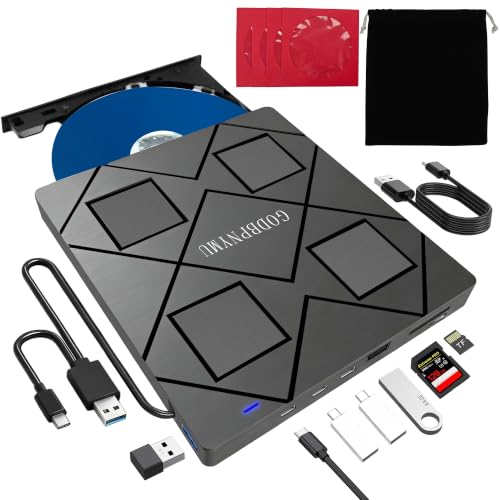
8-in-1 External Blu-ray drive USB-C Hub & Card Reader for Laptop
The most versatile pick for multitaskers, this 8-in-1 drive handles Blu-ray, DVD, and CD playback while doubling as a USB hub and card reader. Connect it via USB-C or USB-A to your Windows, macOS, or Linux laptop. It reads BD-ROM, DVD, and CD formats and burns up to 50GB on dual-layer Blu-ray discs. You’ll need third-party software like PowerDVD to play Blu-ray titles. Use the SD or TF card slot for file transfers, but note you can’t use both simultaneously. It weighs 300g, includes a carry case, and comes with a one-year warranty.
- Disc Support:Blu-ray (read/write), DVD, CD, M-Disc
- Max Read Speed:BD 6x, DVD 8x, CD 24x
- Interface:USB-C 3.0 & USB-A
- OS Compatibility:Windows 11/10/8.1/7/XP, macOS 10.6+, Linux
- Form Factor:Portable, slim; 5.5 x 5.5 x 0.35 in; 300 g
- Warranty:1 year
- Additional Feature:SD/TF card read/write
- Additional Feature:Includes carrying case
- Additional Feature:M-Disc format support
External Blu-Ray DVD CD Burner Drive (USB 3.0)
Offering outstanding value, aelrsoch’s External Blu-Ray DVD CD Burner Drive suits anyone who needs disc compatibility without breaking the bank. Connect it via USB 3.0 or USB-C, and it reads BDs up to 100GB, DVDs up to 8.5GB, and CDs up to 700MB. Read speeds reach 6X for Blu-ray, 8X for DVD, and 24X for CD. Note that Blu-ray playback requires separate software like PowerDVD or VLC, which you’ll need to purchase independently. It supports Windows, macOS, and Linux but won’t work with TVs, tablets, or Chromebooks. A one-year warranty and plug-and-play setup make it straightforward to use.
- Disc Support:Blu-ray (read), DVD, CD (read/write)
- Max Read Speed:BD 6x, DVD 8x, CD 24x
- Interface:USB 3.0 Type-A & Type-C
- OS Compatibility:Windows, macOS, Linux
- Form Factor:Portable, slim; lightweight (dimensions not specified)
- Warranty:1 year (manufacturer)
- Additional Feature:Strong error correction
- Additional Feature:Low noise operation
- Additional Feature:Low power consumption
ASUS SBW-06D5H-U External Slim Blu-ray Burner USB-C
Slim and portable, our editor’s choice ASUS SBW-06D5H-U suits anyone who needs Blu-ray burning without the bulk. It reads Blu-ray discs at 6x–8x and writes at speeds up to 10x, giving you fast, reliable disc handling. Connect it using the included USB-C or USB-A cable, depending on your laptop or desktop port. It supports MDisc for long-term archiving and works with both Windows and macOS. The drive weighs just 240 grams and measures 0.58 inches thin, so you can pack it easily. Its USB 3.1 interface transfers data at 1 Gbps, keeping your workflow efficient.
- Disc Support:Blu-ray (read/write), DVD, CD, M-Disc, BDXL
- Max Read Speed:BD 6x (8x listed in some specs), DVD 8x, CD 24x
- Interface:USB 3.1 Type-A & Type-C
- OS Compatibility:macOS (Windows implied)
- Form Factor:Ultra slim; 5.87 x 5.67 x 0.58 in; 240 g
- Warranty:See product warranty link
- Additional Feature:Ultra-slim 0.58″ profile
- Additional Feature:MDisc archival support
- Additional Feature:Two cables included
External Blu-Ray Drive 6X Bd-Re Burner USB-C and USB 3.0
If you’re looking to burn Blu-rays rather than just play them, the xconflux 6X BD-RE Burner handles that job well. It writes BD-RE discs at 6X, DVDs at 8X, and CDs at 24X. The included 2-in-1 cable connects via USB 3.0 or USB-C, so you don’t need extra adapters. It works with Windows, Mac, and Linux, but not Chromebooks or tablets. For Blu-ray playback, install a third-party app like VLC or PowerDVD. If you’re using a low-power laptop, plug in the included external power cable to maintain consistent performance.
- Disc Support:Blu-ray (read/write), DVD, CD
- Max Read Speed:BD 6x, DVD 8x, CD 24x
- Interface:USB 3.0 Type-A & Type-C
- OS Compatibility:Windows 11/10/8.1/7, macOS, Linux
- Form Factor:Ultra slim; 5.51 x 5.51 x 1.18 in; 13.12 oz
- Warranty:Per Amazon/vendor terms (not explicitly stated)
- Additional Feature:Anti-slip shockproof pads
- Additional Feature:Hidden cable storage slot
- Additional Feature:DVD-RAM format support
Archgon Aluminum External 4K Blu-Ray Writer Drive
The Archgon Aluminum is your premium 4K pick if you need a reliable external Blu-ray writer. It connects via USB 3.0 and writes Blu-ray at 12x and reads at 6x. On PC, you can play UHD 4K discs using CyberLink PowerDVD, which you’ll need to purchase separately. On Mac, UHD playback isn’t supported, but you can still read and write standard Blu-ray, DVD, and CD. The aluminum CNC body adds durability. It also supports M-DISC BD-R for long-term archiving. Avoid using illegal firmware, as it can permanently damage the drive’s functionality.
- Disc Support:Blu-ray (read/write), DVD, CD, UHD 4K, M-Disc
- Max Read Speed:BD 6x, DVD/CD not specified
- Interface:USB 3.0
- OS Compatibility:Windows (UHD); macOS (regular BD/DVD/CD only)
- Form Factor:Desktop; 5.91 x 5.83 x 5.46 in; aluminum body
- Warranty:See product warranty link
- Additional Feature:CNC aluminum enclosure
- Additional Feature:UHD 4K capable
- Additional Feature:12x BD write speed
Multifunction Desktop Blu Ray Drive Blu Ray Burner with HDD Interface
Demanding workloads call for a heavy-duty external Blu-ray drive that does more than just read discs. This unit reads BDs, DVDs, and CDs while also burning them at speeds up to 16x. It includes a built-in HDD enclosure that fits 3.5″ and 2.5″ SATA drives, so you don’t need a separate enclosure. Two USB 3.0 ports transfer data at up to 5 Gbps each. It works with Windows XP through 11 and MacOS. Before using Blu-ray playback, run the Cyberlink BD&3D Advisor tool to confirm your computer supports it.
- Disc Support:Blu-ray (read/write), DVD, CD
- Max Read Speed:BD 16x, DVD 16x, CD 40x
- Interface:USB-C; 2x USB 3.0 hub ports
- OS Compatibility:Windows XP/7/8/10/11, macOS
- Form Factor:Desktop with HDD enclosure; larger unit
- Warranty:1 month
- Additional Feature:3.5″/2.5″ SATA enclosure
- Additional Feature:Dual USB 3.0 hub
- Additional Feature:USB-A fast-charging port
External Blu-Ray Drive USB-A & Type-C DVD CD Reader Writer for Mac Windows
Travelers and remote workers who need the most portable disc drive can count on this USB-A & Type-C model. Connect it to any Windows XP through 11, Linux, or Mac OS device using either interface — no driver installation required. It reads Blu-ray at 6X, DVD at 8X, and CD at 24X. You can also burn DVD and CD discs at 8X. Note that 4K Ultra HD discs aren’t supported. Use compatible third-party software for 3D playback. It comes with a three-month warranty and qualifies for returns within 30 days if it arrives damaged or defective.
- Disc Support:Blu-ray (read), DVD, CD (read/write)
- Max Read Speed:BD 6x, DVD 8x, CD 24x
- Interface:USB 3.0 Type-A & Type-C
- OS Compatibility:Windows XP/7/8/10/11, Linux, macOS
- Form Factor:Slim, portable; lightweight (dimensions not specified)
- Warranty:3 months (manufacturer)
- Additional Feature:Near-4K 3D playback
- Additional Feature:Silent vibration-damping
- Additional Feature:No driver needed
ASUS ZenDrive External DVD Burner with M-Disc Support
Need a dvd-only pick that handles everyday disc tasks without bulk? The ASUS ZenDrive SDRW-08U9M-U/BLK fits that role. At 13mm slim and roughly one pound, you can carry it easily. It reads and writes DVDs and CDs at 8x speed and connects via USB 2.0 or Type-C, so you’re covered on most setups. Use Disc Encryption II to password-protect files or hide sensitive data. M-Disc support lets you archive files on long-lasting discs. It runs on Windows 7–10 and Mac OS X 10.6 or higher, and the one-year warranty backs your purchase.
- Disc Support:DVD, CD, M-Disc (no Blu-ray)
- Max Read Speed:DVD 8x, CD 24x
- Interface:USB 2.0 & Type-C
- OS Compatibility:Windows 7–10, macOS 10.6+
- Form Factor:Ultra slim; 7.9 x 7.09 x 2.36 in; ~1 lb; 13mm height
- Warranty:1 year (manufacturer)
- Additional Feature:Disc Encryption II feature
- Additional Feature:Nero BackItUp included
- Additional Feature:13mm ultra-slim profile
External USB 3.0 Blu-Ray DVD Drive for Laptop/PC
If you’re on a Mac, this USB 3.0 Blu-ray drive handles reading and burning without extra software installs. Plug it into your USB 3.0 or Type-C port, and it powers on immediately. It reads CDs, DVDs, and Blu-ray discs, and burns CDs and DVDs. For Blu-ray playback, download Macgo Blu-ray Player on Mac or PowerDVD on Windows. It supports Windows XP, 7, 8, and 10, plus macOS 10 and below. The aluminum build keeps it compact and portable. You get a 30-day return window, 180-day warranty, and lifetime technical support through Amazon.
- Disc Support:Blu-ray (read), DVD, CD (read/write)
- Max Read Speed:BD 6x, DVD 8x, CD 24x
- Interface:USB 3.0 & Type-C
- OS Compatibility:Windows XP/7/8/10, macOS 10 or below
- Form Factor:Slim, portable; aluminum enclosure; silver
- Warranty:180 days quality assurance; 30-day return
- Additional Feature:Hidden touch eject button
- Additional Feature:2MB cache memory
- Additional Feature:Lifetime tech support
Portable External Blu-Ray Drive & Burner for PC
The LLMHHKYK KL001 packs multi-function versatility into one slim, portable unit. It reads and writes BD, DVD, and CD formats, reaching up to 6x on Blu-ray and 24x on CD. Connect it using the included USB 3.0 Type A or Type C cable, no drivers required. For Blu-ray playback, install software like PowerDVD or VLC first. If performance drops with large discs, plug in the included 5V power adapter. The built-in SD/TF card reader lets you transfer files directly to your computer. It works with Windows, macOS, and Linux, and carries a one-year manufacturer warranty.
- Disc Support:Blu-ray (read/write), DVD, CD
- Max Read Speed:BD 6x, DVD 8x, CD 24x
- Interface:USB 3.0 Type-A & Type-C
- OS Compatibility:Windows, macOS, Linux
- Form Factor:Slim, portable; 6 x 6 x 0.62 in; ~350 g
- Warranty:1 year (manufacturer)
- Additional Feature:7-in-1 hub design
- Additional Feature:Built-in SD/TF reader
- Additional Feature:100GB BD disc support
Sony BDP-S1700U Full HD 1080p Blu-ray DVD Player with HDMI Cable
Sony’s BDP-S1700U stands alone as a top-performing standalone player for home theater setups. Connect it to your TV using the included HDMI cable, and you’ll get Full HD 1080p playback from Blu-ray discs. If you insert a standard DVD, the player upscales it to 1920×1080 resolution. Use the front USB port to play photos, videos, and music directly from a flash drive. The player supports 7.1 surround sound with Dolby Digital TrueHD and DTS. It boots up in under a second, so you won’t wait long to start watching. It covers Blu-ray Region A and DVD Region 1 discs.
- Disc Support:Blu-ray (read/playback only), DVD
- Max Read Speed:DVD/BD 1080p playback (speed not specified)
- Interface:HDMI, front USB
- OS Compatibility:Windows (implied); NTSC format
- Form Factor:Standalone player; 9.1 x 7.8 x 1.6 in; 1.8 lbs
- Warranty:Manufacturer warranty (duration not specified)
- Additional Feature:Sub-second quick start
- Additional Feature:7.1 surround sound
- Additional Feature:Front USB media sharing
LG GP65NB78 Portable External DVD Writer Drive
Weighing almost nothing, LG’s GP65NB78 is the lightweight portable DVD writer you’ll want for travel. At just 14 millimeters thin, it fits easily into a bag without adding bulk. Connect it via USB 2.0 to your PC, and you won’t need an external power source. It writes DVDs at 8x speed and CDs at 24x speed, handling most disc tasks efficiently. You’ll also get M-DISC support, which lets you write to long-lasting archival discs. CyberLink software comes included to get you started. The drive carries a one-year manufacturer’s warranty for added peace of mind.
- Disc Support:DVD, CD, M-Disc (no Blu-ray)
- Max Read Speed:DVD 8x, CD 24x
- Interface:USB 2.0
- OS Compatibility:PC compatible (Windows implied)
- Form Factor:Ultra slim; 14mm height; portable
- Warranty:1 year (manufacturer)
- Additional Feature:14mm slim height
- Additional Feature:CyberLink software included
- Additional Feature:No external power needed
External Blu-Ray Drive USB 3.0 for Laptop/Desktop
An external Blu-ray drive built for those just stepping into optical media, this USB 3.0 model from xconflux removes the guesswork by working straight out of the box. Connect it via USB 3.0 or USB-C, and your laptop or desktop recognizes it immediately—no drivers needed. It reads and writes 50GB BDXL Blu-ray discs, standard DVDs, and CDs, and supports 3D playback. Data transfers reach up to 5 Gbps for stable performance. It runs on Windows 11 down to XP and macOS. Weighing 12.64 ounces with a slim profile, you can pack it into any bag without added bulk.
- Disc Support:Blu-ray (read/write up to 50GB), DVD, CD
- Max Read Speed:BD/DVD/CD 1x (per listed spec)
- Interface:USB 3.0 & Type-C
- OS Compatibility:Windows 11/10/8/7/XP, macOS
- Form Factor:Slim, portable; 12.64 oz
- Warranty:Per Amazon/vendor terms (not explicitly stated)
- Additional Feature:50GB BDXL read/write
- Additional Feature:Driver-free basic use
- Additional Feature:Lightweight slim profile
External DVD Drive USB DVD Drive for Laptop Featuring 8-in-1 Hub
What if you need a DVD drive that also handles hub integration for all your ports and card slots? This unit reads and writes CDs and DVDs, supports CD-R/RW and DVD±R/RW, and adds an 8-in-1 hub with two USB-A ports, two Type-C ports, and a TF/SD card slot. Note that it doesn’t support Blu-ray. Plug it into Windows or macOS devices using the built-in combo cable. On Mac, enable external media access in Security & Privacy first. For dual-layer DVDs, connect a 5V/2A power source. It transfers data up to 480 Mbps and requires no drivers.
- Disc Support:DVD, CD only (no Blu-ray)
- Max Read Speed:DVD 8x, CD 24x
- Interface:USB-A & Type-C combo
- OS Compatibility:Windows 11/10/8/7, Linux, macOS
- Form Factor:Ultra slim; 6.1 x 5.87 x 0.59 in; matte finish
- Warranty:Per Amazon/vendor terms (not explicitly stated)
- Additional Feature:Fingerprint-resistant matte finish
- Additional Feature:Includes 4 CD sleeves
- Additional Feature:Built-in shock absorption
Factors to Consider When Choosing an External Bluray Drive
Before you pick an external Blu-ray drive, you’ll want to check a few key factors to make sure it fits your needs. Look at read and write speeds, interface and connectivity options, disc format compatibility, and portability and build quality. You should also confirm what software the drive requires, since some drives bundle their own playback or burning tools while others depend on third-party programs you’ll need to buy or download separately.
Read and Write Speeds
When shopping for an external Blu-ray drive, read and write speeds directly affect how long it takes to play back or burn discs. Most external drives cap Blu-ray reads at 6X, DVD reads at 8X, and CD reads at 24X. For writing, BD-R/RE speeds typically range from 6X to 12X, while DVDs burn at 8X and CDs at 24X.
If you’re only playing Blu-ray discs, a read-only BD drive works fine. If you need to burn discs, confirm the drive supports BD-R/RE writing at your preferred speed. Also, check that your computer uses USB 3.0 or USB-C, since these interfaces support the bandwidth these speeds require. Keep in mind that your host system’s hardware still determines actual performance.
Interface and Connectivity Options
The interface your external Blu-ray drive uses determines how well it connects to your system and how reliably it performs. Most drives use USB 3.0 or USB-C, and some include both via dual-port cables. USB 3.0 supports up to 5 Gbps, which is sufficient for standard Blu-ray reading and writing. USB-C handles higher power delivery and faster transfer rates, making it a better fit for newer laptops. Check which ports your laptop or desktop has before choosing a drive. If your system has underpowered ports, look for drives that support USB power adapters. Some models also include built-in USB hubs with two or more USB 3.0 ports, letting you connect additional peripherals at the same time without needing a separate hub.
Disc Format Compatibility
Knowing which disc formats a drive supports will save you from buying hardware that can’t handle your media. Most external Blu-ray drives read BD-ROM, BD-R, and BD-RE discs, and many also handle DVD±R/RW and CD-R/RW. Check whether the drive supports BD-XL, since some units only read those discs rather than write to them, limiting you to 100GB capacity in read-only mode.
If you plan to burn discs, confirm the drive writes to BD-R DL at 50GB or standard 25GB single-layer discs. Also verify write speeds, which typically range from 6x to 12x depending on the model. Not all drives support 4K UHD Blu-ray playback, so check that specification separately if you need it.
Portability and Build Quality
Once you’ve confirmed a drive handles your disc formats, portability and build quality determine how well it holds up outside your desk setup. Look for a slim, compact enclosure that fits easily into a bag without adding unnecessary bulk. Many models measure around 5.5–6 inches per side and 0.35–0.75 inches thick, weighing between 240–350 grams. Check for aluminum or sturdy plastic shells that resist bending under pressure. A built-in USB-C or USB-A/USB-C cable eliminates loose cords and keeps your kit organized during travel. Avoid drives that require separate cables, since those add clutter and increase the chance of losing a connector. Also confirm the drive offers dual-interface support, covering both USB 3.0 and USB-C, so it connects reliably to different laptops and desktops.
Software Requirements
Don’t assume a Blu-ray drive alone is enough to start watching discs, because most operating systems don’t include built-in Blu-ray playback software. You’ll need to install a compatible third-party program before you can play anything. On Windows, CyberLink PowerDVD is a reliable and widely recommended option that supports standard and UHD Blu-ray playback. For 3D Blu-ray, confirm that your software and display both support it, since neither is guaranteed by default. Mac users face more limitations, particularly with UHD content, so check compatibility before purchasing. If your drive supports Blu-ray writing, you’ll also need software that handles BD-R or BD-RE media specifically. Some drives bundle software, but many don’t, so factor in the additional cost or download time before committing to a purchase.
Final Thoughts
You’ve got eight solid options to match your setup, budget, and disc needs. Check your laptop’s ports first, then match the drive to your use case—portable for travel, hub models if you need extra connectivity, and USB 3.0 drives for faster transfers. Confirm compatibility with your OS, verify BD-XL support if you need high-capacity discs, and review bundled software before buying. Pick the specs that fit your workflow and move forward.